


PikPak-Safe Cloud, Video Saver
4.8231.00 Reviews
App Specs
- Version
- 2.3.2
- Updated On
- License
- Free
- Downloads
- 1,000,000+
- Developer
- PikCloud Pte. Ltd.
- Categories
- Productivity
- Platform
- Android
Screenshots

 Analysis by AppCompare
I often reach for my phone to save something useful—a clip to watch later, a file I need on another device—and then run into the same small annoyances: nowhere convenient to keep it, or no easy way to get it onto the device I’m using next. That is the problem PikPak-Safe Cloud, Video Saver is meant to address. I find its appeal less about collecting every possible feature and more about having one place to store files and retrieve them when I need them.
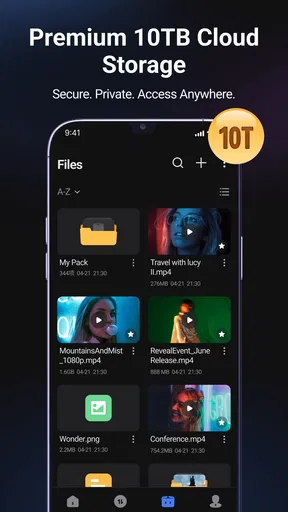
That focus makes it worth considering for people who move between a phone, tablet, and computer or regularly save media for later. It is a free productivity app from PIKCLOUD PTE. LTD., and its stated cloud capacity can reach 10TB. That ceiling sounds generous, but the useful question is whether a cloud library fits your habits: storage can reduce clutter on a device, but it still takes a connection and a little organization to make saved files easy to find.
Getting Started with PikPak
Jumping into PikPak is super straightforward. The app is available for both Android and iOS, which is always a plus in my book. Once you download it, you’re greeted with a clean interface that’s intuitive and easy to navigate. Setting up an account is a breeze, and before you know it, you’re ready to start saving all the content your heart desires.
Before moving a large collection over, I’d start with a small test: upload a few different kinds of files, then retrieve one on another device. That quickly shows whether the workflow suits you and helps establish a naming habit before the cloud fills with vaguely labeled items. I’d name files by subject or purpose rather than relying on memory; a sensible filename is often more useful than another folder layer when you are trying to locate one clip in a hurry.
The app is listed for Android devices running version 6.0 or later, and it is also available on iOS. Its current version is 2.2.0. The age rating is Everyone, so its audience is broad, though that does not remove the need to think carefully about what personal material you choose to store online. The app has a 4.7 average from around 11,000 ratings, and has passed over 1 million installs. Those figures suggest many people have tried it, but I would still judge it by whether its storage and retrieval routine works for my own files.
Features That Stand Out
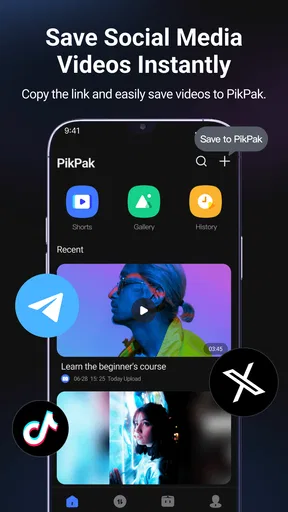
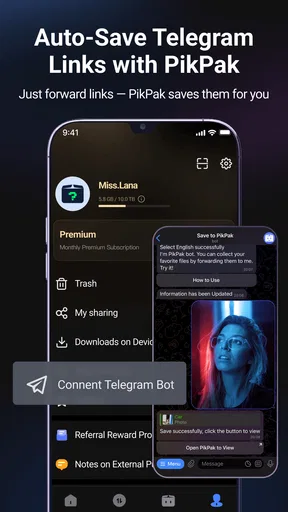
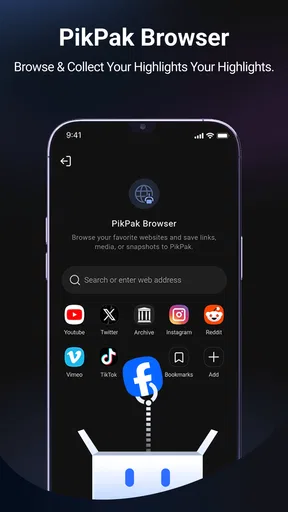
One of the standout features of PikPak is the ability to save videos directly from popular social media sites. Whether it’s a hilarious TikTok you just can’t get enough of, or a heartwarming Facebook video, PikPak makes saving these gems a cinch. You just copy the link, paste it into the app, and voilà—it’s stored safely in the cloud.
That link-based approach can be handy when you come across something while scrolling and do not want to interrupt what you are doing to manage downloads in several places. I would treat it as a quick capture step, then give the saved item a recognizable name or sort it soon afterward. A collection of clips called “video” is no easier to browse than a crowded camera roll. Also, a saved copy is not a substitute for permission to reuse someone else’s media; for personal viewing, I would keep the creator and platform rules in mind.
Worth Reading Before You Choose

Flipboard Shows What News Apps Must Do Beyond the Feed

Switching to Android Auto Means Rethinking Your Driving Routine

Google Calendar Makes a Crowded Week Easier to Manage

Ludo King Makes the Most of the Minutes Between Plans

Baby Panda World Brings Quick Play to Modern Phones, but Its Game Library Feels Busy

ESPN’s Live Game View Makes Following Close Games Easier
But it doesn’t stop there. PikPak also offers a robust cloud storage solution. You can upload files, photos, and even audio clips, ensuring you have access to all your important data anytime and anywhere. And let’s talk about the storage space! It’s surprisingly generous, especially for free users. Of course, if you’re a digital hoarder like me, upgrading to a premium plan might be worth considering.
For everyday use, I’d separate files according to how I expect to retrieve them: perhaps one group for work references, another for travel documents, and another for videos I want to watch later. That is a practical habit rather than a special feature, but it prevents the cloud from becoming a second, less visible version of the same clutter on your phone. If you are moving a large archive, start with the files you actually use; uploading everything at once can take time and makes it harder to notice whether the new setup is helping.
A realistic example is saving a tutorial while commuting, then opening it later on a larger screen when you are ready to follow along. Another is keeping a scan or presentation available when you switch devices for a meeting. In both cases, the benefit is avoiding the hunt through messages, browser tabs, and local folders. The trade-off is that retrieval depends on internet access unless you have separately made a local copy, so I would not rely on cloud access alone for a file I absolutely need during a trip or a presentation.
Security and Privacy
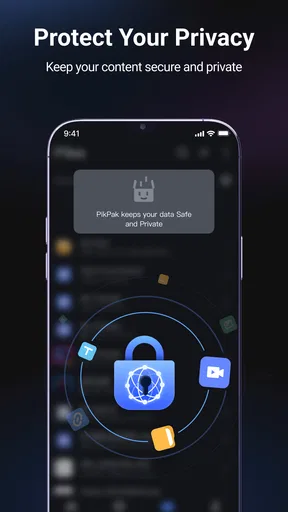
In today’s world, security is a big deal. I’m happy to report that PikPak takes this seriously. The app uses advanced encryption methods to ensure your data stays private and secure. Plus, the option to password-protect individual files is a nice touch for those extra sensitive documents or personal videos.
I would still be selective about what I upload. Cloud storage is convenient, but convenience should not replace basic judgment: use a strong account password, avoid sharing sensitive material casually, and think through who can access a file before sending it on. A password-protected item can add a useful barrier, but I would not treat that as a reason to store every confidential document without considering the consequences of account access or link sharing.
Performance and Usability
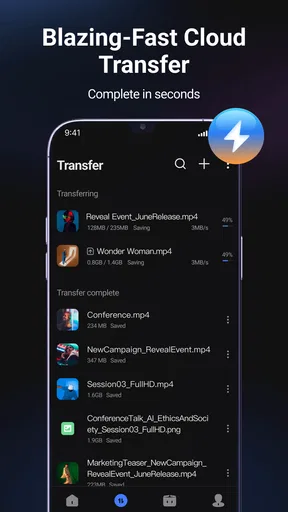
From a performance standpoint, PikPak is pretty solid. Uploads and downloads are swift, provided you have a decent internet connection. The app runs smoothly without any noticeable lag or crashes, which is always a welcome relief. I also appreciate the multi-language support, making it accessible to a wider audience.
For a more reliable routine, I’d upload bulky media while connected to a stable network rather than assuming a weak mobile connection will finish the job quickly. When a file matters, I would also open it after uploading instead of treating the upload indicator as proof that it is ready for use. This small check catches a failed transfer before the moment I actually need the file. It also helps set realistic expectations: cloud storage makes files easier to move between devices, but it cannot make a slow connection fast.
Usability-wise, PikPak shines with its user-friendly interface. Whether you’re tech-savvy or a complete novice, navigating through the app feels natural. The icons are self-explanatory, and the layout is organized, which makes finding files a hassle-free experience.
Compared with keeping everything in a phone’s downloads folder, a cloud library is more useful when you need the same material on several devices or want to free local space. Compared with a general-purpose cloud drive, PikPak’s video-saving angle may suit people who collect online clips as well as ordinary files. But if your main need is real-time teamwork on documents, shared editing, or tight integration with an existing office workflow, I would choose a service built around those tasks instead. The right alternative depends on what you retrieve most often, not simply on how much storage looks available.
Why You Might Love PikPak
So, why should you give PikPak a shot? If you’re someone who consumes a lot of media and often runs into storage issues, this app is a game-changer. It effortlessly bridges the gap between saving content and managing storage, all while keeping your data safe and accessible.
I think it is best for people who want a straightforward place for saved videos and personal files, especially when their phone is not the only device they use. Students could keep reference clips and class materials together; a frequent traveler might gather documents and entertainment before leaving; and anyone who sends files to family could use one storage spot rather than repeatedly hunting through local folders. These are most useful when the files are not too time-sensitive and the user is comfortable relying on a cloud account.
On the other hand, someone who rarely changes devices, has a dependable local filing system, or needs offline access above all else may not gain much from adding another app. The same is true for a person who wants a dedicated video player rather than storage and saving tools. I would also pause before paying for more room until I had checked what I actually keep and how often I retrieve it; a large capacity is only valuable if it solves a real storage problem.
Moreover, the ability to share files seamlessly with friends and family is another highlight. You can create shareable links or invite others to view specific folders, making collaboration and sharing a piece of cake.
For sharing, I would use a narrow folder or a single file rather than exposing a broad collection by accident. Before sending anything, check that the item is the one you intended and that the recipient should have access. This is a simple safeguard, but it matters when a cloud app is used for both personal media and practical documents. Sharing is convenient for passing along a file; it is not automatically a replacement for a collaborative workspace where several people need to edit and track changes.
Final Thoughts
All in all, PikPak-Safe Cloud, Video Saver is a robust tool that caters to anyone looking to streamline their media saving and storage needs. It’s reliable, efficient, and packed with features that make it a standout choice in the crowded app market. Whether you’re a student, a professional, or just someone who loves hoarding cat videos, PikPak has got you covered.
In practical terms, the deciding question is whether you want saved media and files gathered in a cloud account, rather than scattered across device storage and temporary links. The app is free to install, with in-app purchases ranging from $4.99 to $409.99 per item, so I would look at the available purchase details in the app and decide based on a real need instead of assuming a paid option is necessary. I would begin with a modest collection, see whether I can reliably find and open it across my devices, and only then consider expanding my use.
So, if you haven’t already, give PikPak a whirl. It might just be the app you didn’t know you needed!
Pros
- User-friendly interface
- easy to navigate.
- Supports multiple file formats for uploads.
- High-speed downloads
- saves time.
- Secure cloud storage with encryption.
- Offline access to saved videos.
Cons
- Limited free storage space available.
- Ads can be intrusive at times.
- No direct streaming from the app.
- Requires account registration to use.
- Occasional sync issues with files.
FAQs for PikPak-Safe Cloud, Video Saver
What is PikPak-Safe Cloud, Video Saver used for?
PikPak-Safe Cloud, Video Saver is designed to securely store and manage your videos in the cloud. It allows you to download, save, and organize your video content efficiently. With its user-friendly interface, you can access your files from anywhere, ensuring your media is always at your fingertips.
How secure is my data with PikPak-Safe Cloud, Video Saver?
PikPak-Safe Cloud, Video Saver prioritizes user data security by implementing robust encryption methods. Your files are encrypted both during transfer and while in storage, ensuring that unauthorized access is prevented. Additionally, the app regularly updates its security protocols to safeguard your information.
Can I use PikPak-Safe Cloud, Video Saver offline?
While PikPak-Safe Cloud, Video Saver is primarily a cloud-based service, you can download videos to your device for offline viewing. This feature is particularly useful when you’re in areas with limited internet connectivity, allowing you uninterrupted access to your media content.
What are the storage limits for PikPak-Safe Cloud, Video Saver?
PikPak-Safe Cloud, Video Saver offers various storage plans to accommodate different user needs. The free version provides a limited amount of space suitable for casual users, while premium subscriptions offer expanded storage options. These plans are designed to cater to both personal and professional requirements.
Is PikPak-Safe Cloud, Video Saver compatible with multiple devices?
Yes, PikPak-Safe Cloud, Video Saver is compatible with both Android and iOS devices. It supports seamless synchronization across multiple devices, ensuring that you can access your videos and manage your cloud storage effortlessly, regardless of the platform you’re using.


